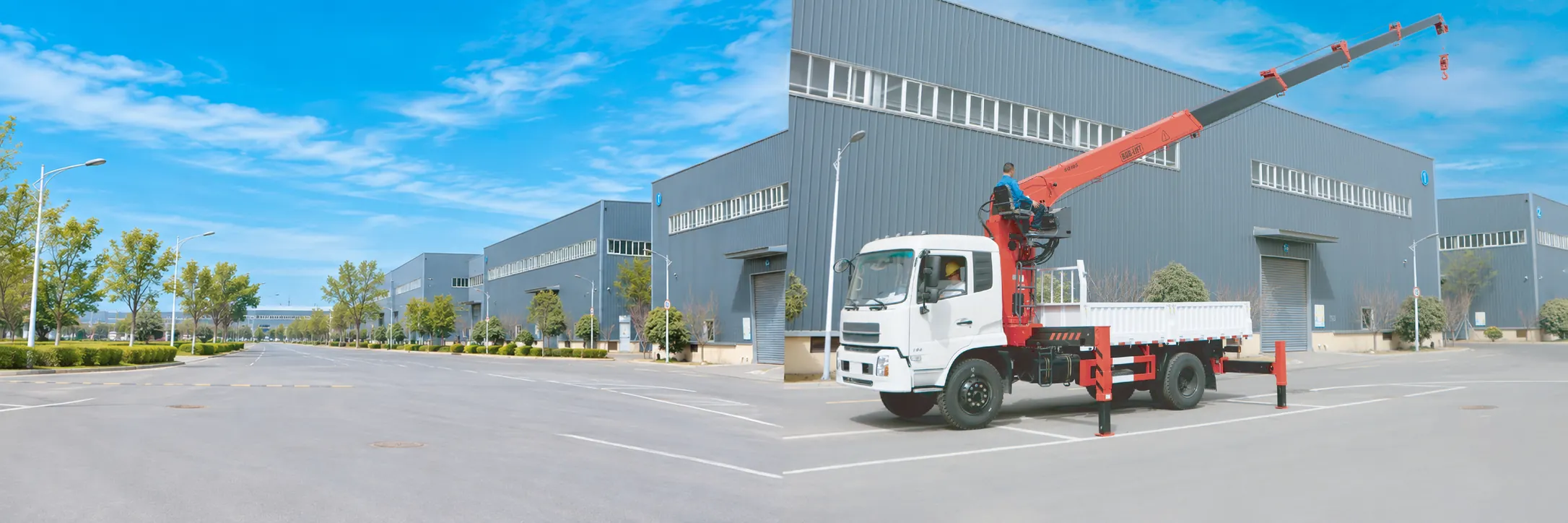

A crane remote control is a handheld or belly-box radio transmitter that lets the operator run a truck mounted crane’s hydraulic functions from anywhere around the truck, instead of from the control levers on the crane base. On a truck crane it is one of three ways to work the crane: levers at the base, a high seat above the column, or a wireless remote. Which one is right depends less on the crane’s size than on where the operator needs to stand to see the load.
BOB-LIFT has built truck mounted cranes since 2003 and exported them to 124 countries and regions. Our knuckle boom and telescopic cranes come with manual levers as standard, and a high seat or a wireless remote control on request. This guide explains how a truck crane remote control works, how it compares with levers and a high seat, what to specify when you order one, and the safety rules that still apply when the operator walks away from the levers.
Key takeaways
- A truck crane can be worked from levers at the base, a high seat above the column or a wireless remote. Many cranes keep the levers even when a remote is fitted.
- A remote lets the operator stand where they can see the load and the landing point, which matters most for blind lifts over a building, a wall or the far side of the truck.
- A remote needs electrically operated hydraulic valves on the crane, so it is best ordered with the crane rather than added later.
- Every transmitter should have an emergency stop, and the crane should stop if the radio link is lost.
- A remote does not change the operator’s duties: the same training, load chart, outrigger set-up and exclusion zone apply.
What are the ways to operate a truck mounted crane?
There are three common control positions on a truck mounted crane, and each puts the operator in a different place.
- Manual levers at the base. A bank of hydraulic control levers sits on the crane base, often on both sides so the operator can work from the side with the better view. This is the simplest and most common set-up on small and medium cranes.
- A high seat above the column. On larger knuckle boom cranes, a seat with its own control levers is mounted high on the column. It slews with the crane, so the operator always faces the boom and looks down over the load bed and any wall or fence.
- A wireless remote control. The operator carries a transmitter on a shoulder strap or belt and walks to the best viewpoint. A receiver on the crane turns each command into a signal for the hydraulic valve.

How does a wireless crane remote control work?
A wireless crane remote control works by radio. The transmitter sends each lever or button movement to a receiver on the crane, and the receiver drives electrically operated sections of the crane’s main control valve. The valve then moves the boom, slews the crane or runs the winch exactly as a hand lever would.
The parts that matter to a buyer are these:
- Transmitter. Usually a belly box with small joysticks or paddle levers, one for each crane function, plus a start button, a speed selector and a red emergency stop.
- Receiver. A sealed box on the crane that is paired to one transmitter, so a second remote on the same site cannot move your crane.
- Proportional valve. A remote is only as smooth as the valve it drives. With a proportional valve, a small movement of the joystick gives a slow movement of the boom; with on/off valves, each function runs at a single speed.
- Battery and cable back-up. The transmitter runs on rechargeable batteries. Many systems can also work through a cable if the battery runs flat or the radio link is poor.
Because the radio controls the valve electrically, a remote is not a part you simply plug in. The crane must have a valve with electric actuators, wiring to the receiver and a power supply from the truck. That is why it is easier and cheaper to order a remote with a new crane than to add one later.
Basic vs proportional remote: what is the difference?
Crane remotes usually come in two grades, a basic remote and a proportional remote. The exact set-up depends on the crane model and the options in your order, but the two usually differ in three ways:
- Speed. A basic remote runs each movement at one constant speed. A proportional remote lets the operator adjust the speed of each movement.
- Movements. A basic remote runs one movement at a time. A proportional remote can run several movements at once, for example extending the boom while raising or lowering it.
- Connection. A basic remote is often wired, while a proportional remote is usually wireless. Check what your quotation includes.
The proportional remote costs noticeably more, so match it to the work. A basic remote is enough for simple lifts where one movement at a time is fine. Choose proportional control if you place loads precisely, work close to people or buildings, or want to combine movements to save time on every lift. You can ask us to quote both options on the same crane.
What do the rules say about crane remote controls?
There is no separate licence for a crane remote control, but the crane, the radio and the operator are each covered by rules. The main ones for truck mounted crane buyers are these.
- European Union, the crane. Annex I of the Machinery Directive 2006/42/EC says that for cable-less control, “an automatic stop must be activated when correct control signals are not received, including loss of communication”. It also says each remote control unit “must clearly identify the machinery to be controlled from that unit”. The new Machinery Regulation (EU) 2023/1230 replaces the directive from 20 January 2027.
- European Union, the radio. A remote control transmitter emits radio waves, so it is radio equipment under the Radio Equipment Directive 2014/53/EU.
- European standards. EN 12999 is the European standard for loader cranes, and EN 13557:2024 sets design requirements for crane control devices and control stations. The emergency stop function itself follows ISO 13850.
- United States, the radio. Unlicensed transmitters fall under FCC Part 15. They must be certified before they are marketed, and they may be used only on condition that they cause no harmful interference and accept any interference they receive.
- United States, the operator. OSHA’s crane rules for construction have no separate section for remote controls. The operator qualification rule in 29 CFR 1926.1427 applies in the same way, and ASME B30.22 shows a rear-mounted truck crane with remote control as one of the articulating crane set-ups it covers.
- Great Britain. The HSE safety bulletin on lorry loaders says that “where available, remote controls should be used for the operation of stabilisers”, and that the operator “should stand in a position suitable to observe the operation but outside of the danger zone”.
Always check the rules where you work; they can differ by country and by the type of job.
Remote control vs levers vs high seat: which is better?
None of the three is better for every job. This table compares them on the points buyers ask about most.
| Point | Manual levers | High seat | Wireless remote |
|---|---|---|---|
| Where the operator stands | Beside the crane base | On the column, above the load bed | Anywhere within radio range |
| View of the load | Good near the truck, poor over walls or the far side | Good over the load bed and low obstacles | Best: the operator walks to the landing point |
| Typical cranes | All sizes, standard on small cranes | Larger knuckle boom cranes | All sizes, on request |
| Extra parts on the crane | None | Seat, second lever bank, access steps | Electric valve sections, receiver, wiring, batteries |
| What to check daily | Lever return and markings | Seat, steps, levers | Emergency stop, battery, start-up check |
| Main risk | Operator cannot see the load | Climbing up and down | Operator stands too close to the load or under it |
In practice, many crane owners choose a remote for delivery work, where every drop is different and the operator often has to place a load over a wall, onto a roof or behind the truck. Levers are enough when the crane always loads and unloads beside the truck, such as at a yard or a fixed workshop. A high seat suits long working days with a large knuckle boom crane, where the operator wants a raised view and a seat.
Example scenario (an illustration, not a customer record): a builders’ merchant delivers blocks on pallets and often sets them over a 2 m garden wall. From the levers at the base, the operator cannot see the landing point and needs a signaller. With a remote, the operator walks to the wall, sees the pallet and the ground, and places it alone, while still keeping out of the load’s path.

What should you specify when ordering a crane with a remote control?
A clear specification avoids a remote that works badly or cannot be used in your country. Before you confirm the order, agree these points in writing:
- Functions on the remote. List every function the remote must run: slewing, main boom, outer boom, telescopic extensions, winch and any attachment such as a grab or rotator. Ask whether outriggers can be worked from the remote or only from the levers.
- Proportional control. Ask for proportional control on the boom and slewing functions if you place loads precisely.
- Radio approval for your market. The transmitter is a radio device, so it must be approved for the country where it will be used. In the European Union it is covered by the Radio Equipment Directive, and in the United States by FCC Part 15. Ask which approval marks the transmitter carries.
- Emergency stop and start-up check. Confirm the transmitter has an emergency stop and that the crane stops if the radio link is lost.
- Levers kept on the crane. Keep the manual levers as a back-up, so the crane can still be folded and stowed if the remote fails.
- Spare battery, charger and cable. A second battery and a charger that runs from the truck keep the crane working through a full day.
- Manual and training. Our manuals are in English as standard, and other languages are available if you ask in advance. Training is not included at delivery, but your team can come to our factory to learn.
Our guide to buying a truck mounted crane from China covers the rest of the quotation, and our article on truck mounted crane parts shows where the control valve and the levers sit on the crane.
How do you work safely with a remote-controlled crane?
A remote gives the operator freedom to move, and that freedom is also its main risk. These rules keep it a safety gain:
- Stand where you can see, outside the danger zone. Pick a spot with a clear view of the load and the landing point, but never under the load or in its path. OSHA’s 29 CFR 1926.1425 keeps workers out of the fall zone except while they hook, unhook or guide a load.
- Test the emergency stop before work. Press it at start-up and check that every function stops.
- Do not walk off with a load in the air. Under 29 CFR 1926.1417, “the operator must not leave the controls while the load is suspended”, apart from listed exceptions.
- Switch off and keep the transmitter with you. When you stop work, switch the transmitter off so nobody else can use it.
- Learn the remote before you use it. Practise each function slowly on a new crane. Every remote layout is a little different.
- Set up the outriggers first. The load chart applies only with the outriggers set as the manual requires. Our guide to crane outriggers and ground bearing pressure explains how.
Add the transmitter to the daily check in our truck mounted crane inspection checklist: casing, joysticks, emergency stop, battery and the crane identification label.
Frequently asked questions
Can I add a remote control to an existing crane?
Often, but not always. The crane needs a control valve with electrically operated sections, wiring and a receiver. If the crane has a purely manual valve, the valve may have to be changed. It is simpler and costs less to order the remote with the crane.
What is the range of a crane remote control?
It depends on the system and the site, but it is normally enough to walk around the truck and to the landing point. Range is not the limit that matters: the operator should always stay where they can see the load clearly.
Does a remote-controlled crane still need a qualified operator?
Yes. A remote changes where the operator stands, not who may operate. In the United States, 29 CFR 1926.1427 requires operators of covered cranes to be trained, certified or licensed and evaluated, and it has no exception for remote operation.
What happens if the remote battery runs out or the signal is lost?
The crane should stop. Under the EU Machinery Directive, cable-less controls must trigger an automatic stop when correct signals are not received. You can then fit a spare battery, connect the back-up cable if the system has one, or use the manual levers.
Is a remote control safer than levers?
It can be, because the operator can stand away from the danger zone with a clear view of the load. It becomes less safe if the operator walks too close to the load or works out of sight of it, so training and a good standing position still matter.
What is the difference between a basic and a proportional crane remote?
A basic remote runs one movement at a time at a fixed speed and is often wired. A proportional remote is usually wireless, lets you vary the speed of each movement and can run several movements together. It costs more but gives smoother, faster lifting. The exact remote depends on the crane model, so confirm it in your quotation.
How we compiled this guide
The control options come from the BOB-LIFT product range and our technical department, and the SQZ430 figures from its dimension drawing. The photos show real cranes and a real customer visit at our Xuzhou factory. The rules and standards are summarised from the official texts linked in the guide, as they stood in October 2026. The guide was reviewed by Achord Chan, Product Operations Director, in October 2026. It does not replace the crane’s operating manual, the remote control maker’s instructions or the rules where you work.
Choose the right controls for your crane
Tell us the crane size you need, the jobs it will do and where you will use it, and we will suggest a model and a control set-up, with the drawing and load chart. Every crane carries a 12-month warranty on the whole machine, common spare parts are dispatched within 48 hours, and our service team replies within 12 hours with video guidance when needed. You can read more about us on the About us page. Browse our knuckle boom truck cranes and telescopic boom truck cranes, or contact us to start.